Self-hosted Forgejo runner in Kubernetes


In your life as professional software developer you want to have a sourcecode management system and some kind of automated build of your software bundles.
In the old days we often used a Git repository in combination with Jenkins as build system. Jenkins was divided up to a Jenkins Master and several Jenkins agents. Often it was a manual setup and adding building resources - Jenkins agents - took time and the setup did not scale very well.
Today in a Kubernetes world the sourcecode management system and the build system is combined into one product. GitHub and GitHub actions is an often used example.
But what if we want to have more control having such a system on premise? No problem, a self hosted Forgejo as sourcecode repository can be your friend. The build system is compatible to GitHub actions.
The setup is not too complicated. It consists of a Forgejo installation (I did this in docker) and for the build actions we need build runners doing all the work. In my case I deployed the runners in Kubernetes.
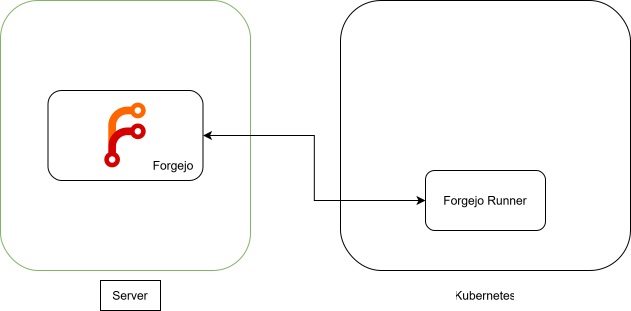
The Forgejo installation itself is well documented but the runner installation in Kubernetes was a little bit fiddly for me, especially if you need to be able to run docker inside the Forgejo runner. So here is my setup approach.
Kubernetes Forgejo Runner setup
step-by-step
All steps can be conbined into one Kubernetes yaml deployment file.
Step 1: Kubernetes namespace
I wanted to put the forgejo runner into a separate namespace in my Kubernetes.
kind: Namespace
apiVersion: v1
metadata:
  name: forgejo
Step 2: create runner token
In forgejo the runners can be defined in several places. Here we want to add a runner for an organisation.
Open the settings page for your organization -> Action -> Runners and reate a new runner.
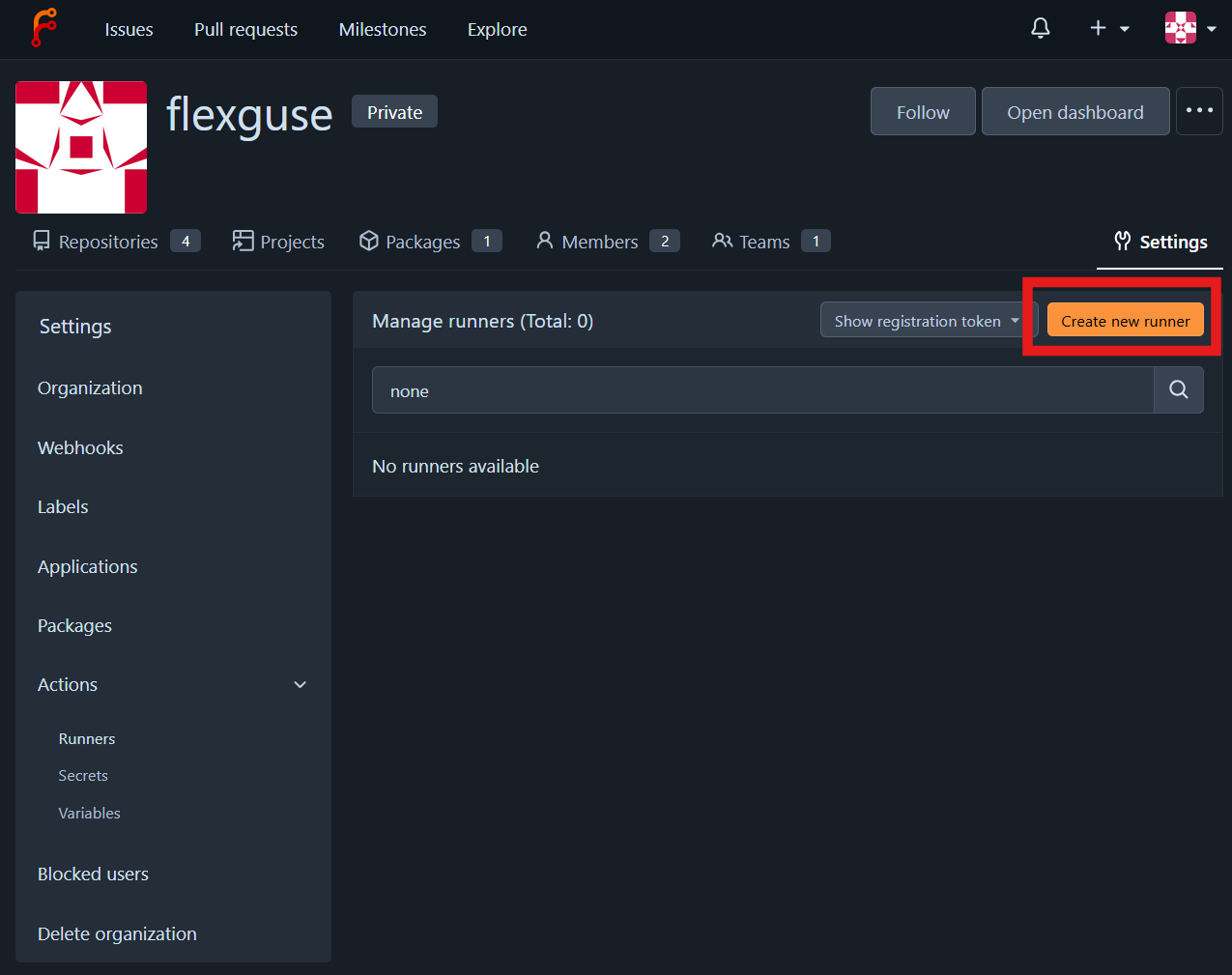
Add a name for the runner, description is optional and create the runner. A YAML configuration snippet is created containing the runner UUID and the runner token.
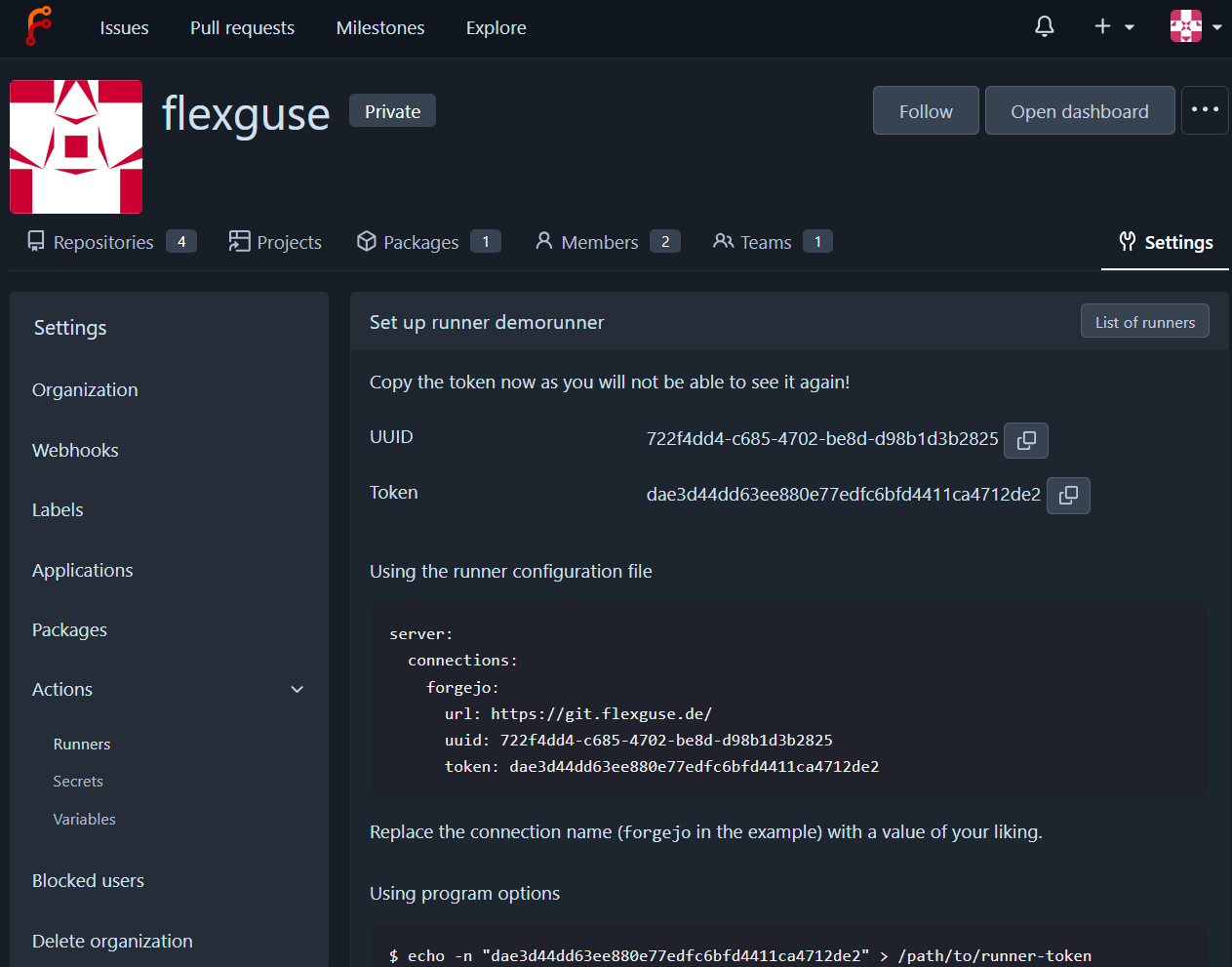
This runner configuration is needed for the forgejo configuration.
Step 3: add Forgejo configuration
To configure Forgejo we create a ConfigMap containing the configuration.yaml file.
This configuration contains the settings i.e. for Docker available for a buildjob and the available base build images.
apiVersion: v1
kind: ConfigMap
metadata:
  name: forgejo-runner-config
  namespace: forgejo
data:
  runner-config.yml: |
    # Example configuration file, it's safe to copy this as the default config file without any modification.

    # You don't have to copy this file to your instance,
    # just run `forgejo-runner generate-config > config.yaml` to generate a config file.

    #
    # The value of level or job_level can be trace, debug, info, warn, error or fatal
    #
    log:
      #
      # What is displayed in the output of the runner process but not sent
      # to the Forgejo instance.
      #
      level: info
      #
      # What is sent to the Forgejo instance and therefore
      # visible in the web UI for a given job.
      #
      job_level: info

    runner:
      # Where to store the registration result.
      file: .runner
      # Execute how many tasks concurrently at the same time.
      capacity: 1
      # Extra environment variables to run jobs.
      envs:
      # Extra environment variables to run jobs from a file.
      # It will be ignored if it's empty or the file doesn't exist.
      env_file: .env
      # The timeout for a job to be finished.
      # Please note that the Forgejo instance also has a timeout (3h by default) for the job.
      # So the job could be stopped by the Forgejo instance if its timeout is shorter than this.
      timeout: 3h
      # The timeout for the runner to wait for running jobs to finish when
      # shutting down because a TERM or INT signal has been received.  Any
      # running jobs that haven't finished after this timeout will be
      # canceled.
      # If unset or zero, the jobs will be canceled immediately.
      shutdown_timeout: 3h
      # Whether skip verifying the TLS certificate of the instance.
      insecure: false
      # The timeout for fetching the job from the Forgejo instance.
      fetch_timeout: 30s
      # The interval for fetching the job from the Forgejo instance.
      fetch_interval: 2s
      # The interval for reporting the job status and logs to the Forgejo instance.
      report_interval: 1s
      # At the end of a job, retry configuration for sending logs to remote.
      # report_retry:
      #   # Maximum number of retry attempts.
      #   max_retries: 10
      #   # Initial delay between retries.  Delay between retries doubles up to `max_delay`.
      #   initial_delay: 100ms
      #   # Maximum delay between retries, defaults to 0, 0 is treated as no maximum.
      #   max_delay: 0
      # The labels of a runner are used to determine which jobs the runner can run and how to run them.
      # Like: ["macos-arm64:host", "ubuntu-latest:docker://node:20-bookworm", "ubuntu-22.04:docker://node:20-bookworm"]
      # If it's empty when registering, it will ask for inputting labels.
      # If it's empty when executing the `daemon`, it will use labels in the `.runner` file.
      labels:
        - ubuntu-latest:docker://ghcr.io/catthehacker/ubuntu:act-latest
        - ubuntu-24.04:docker://ghcr.io/catthehacker/ubuntu:act-24.04
        - ubuntu-22.04:docker://ghcr.io/catthehacker/ubuntu:act-22.04

    cache:
      #
      # When enabled, workflows will be given the ACTIONS_CACHE_URL environment variable
      # used by the https://code.forgejo.org/actions/cache action. The server at this
      # URL must implement a compliant REST API, and it must also be reachable from
      # the container or host running the workflows.
      #
      # See also https://forgejo.org/docs/next/user/actions/advanced-features/#cache
      #
      # When it is not enabled, none of the following options apply.
      #
      # It works as follows:
      #
      # - the workflow is given a one-time use ACTIONS_CACHE_URL
      # - a cache proxy listens to ACTIONS_CACHE_URL
      # - the cache proxy securely communicates with the cache server using
      #   a shared secret
      #
      enabled: true
      #
      #######################################################################
      #
      # Only used for the internal cache server.
      #
      # If external_server is not set, the Forgejo runner will spawn a
      # cache server that will be used by the cache proxy.
      #
      #######################################################################
      #
      # The port being bound by the internal cache server.
      # 0 means to use a random available port.
      #
      port: 0
      #
      # The directory to store the cache data.
      #
      # If empty, the cache data will be stored in $HOME/.cache/actcache.
      #
      dir: ""
      #
      #######################################################################
      #
      # Only used for the external cache server.
      #
      # If external_server is set, the internal cache server is not
      # spawned.
      #
      #######################################################################
      #
      # The URL of the cache server. The URL should generally end with
      # "/". The cache proxy will forward requests to the external
      # server. The requests are authenticated with the "secret" that is
      # shared with the external server.
      #
      external_server: ""
      #
      # The shared cache secret used to secure the communications between
      # the cache proxy and the cache server.
      #
      # If empty, it will be generated to a new secret automatically when
      # the server starts, and it will stay the same until it restarts.
      #
      # `secret` and `secret_url` are mutually exclusive.
      #
      secret: ""
      #
      # The secret for securing the cache can alternatively be loaded from a URL.
      # Currently, only file URLs can be resolved. Example:
      # `file:/path/to/secret.txt`.
      #
      # `secret_url` supports a single placeholder: `$CREDENTIALS_DIRECTORY`. If
      # the environment variable `CREDENTIALS_DIRECTORY` exists, the placeholder is
      # replaced with the value of `CREDENTIALS_DIRECTORY`. Otherwise, it is
      # retained.
      #
      #  Example: file:$CREDENTIALS_DIRECTORY/secret.txt
      #
      # `secret` and `secret_url` are mutually exclusive.
      #
      secret_url: ""
      #
      #######################################################################
      #
      # Common to the internal and external cache server
      #
      #######################################################################
      #
      # The IP or hostname (195.84.20.30 or example.com) to use when constructing
      # ACTIONS_CACHE_URL which is the URL of the cache proxy.
      #
      # If empty, it will be detected automatically.
      #
      # It may be impossible to figure out the host automatically if the containers
      # or host running the workflows reside on a different network than the Forgejo
      # runner. For example, if the Docker server used to create containers is not
      # running on the same host as the Forgejo runner.
      # In that case you can specify which IP or hostname to use to reach the
      # internal cache server created by the Forgejo runner.
      #
      host: ""
      #
      # The port bound by the internal cache proxy.
      # 0 means to use a random available port.
      #
      proxy_port: 0
      #
      # Overrides the ACTIONS_CACHE_URL variable passed to workflow
      # containers. The URL should generally not end with "/". This should only
      # be used if the runner host is not reachable from the workflow containers
      # and requires further setup.
      #
      actions_cache_url_override: ""

    container:
      # Specifies the network to which the container will connect.
      # Could be `host`, `bridge` or the name of a custom network.
      # If it's empty, create a network automatically.
      network: ""
      # Whether to create networks with IPv6 enabled. Requires the Docker daemon to be set up accordingly.
      # Only takes effect if "network" is set to "".
      enable_ipv6: false
      # Whether to use privileged mode or not when launching task containers (privileged mode is required for Docker-in-Docker).
      privileged: false
      # And other options to be used when the container is started (e.g., --volume /etc/ssl/certs:/etc/ssl/certs:ro).
      options: "--add-host=docker:host-gateway -v /certs:/certs -e DOCKER_HOST=tcp://docker:2376 -e DOCKER_CERT_PATH=/certs/client -e DOCKER_TLS_CERTDIR=/certs -e DOCKER_TLS_VERIFY=1"
      # The parent directory of a job's working directory.
      # If it's empty, /workspace will be used.
      workdir_parent:
      # Volumes (including bind mounts) can be mounted to containers. Glob syntax is supported, see https://github.com/gobwas/glob
      # You can specify multiple volumes. If the sequence is empty, no volumes can be mounted.
      # For example, if you only allow containers to mount the `data` volume and all the JSON files in `/src`, you should change the config to:
      # valid_volumes:
      #   - data
      #   - /etc/ssl/certs
      # If you want to allow any volume, please use the following configuration:
      # valid_volumes:
      #   - '**'
      valid_volumes:
        - /certs
      # Overrides the docker host set by the DOCKER_HOST environment variable, and mounts on the job container.
      # If "-" or "", no docker host will be mounted in the job container
      # If "automount", an available docker host will automatically be found and mounted in the job container (e.g., /var/run/docker.sock).
      # If it's a url, the specified docker host will be mounted in the job container
      # Example urls: unix:///run/docker.socket or ssh://user@host
      # The specified socket is mounted within the job container at /var/run/docker.sock
      docker_host: "-"
      # Pull docker image(s) even if already present
      force_pull: false
      # Rebuild local docker image(s) even if already present
      force_rebuild: false

    host:
      # The parent directory of a job's working directory.
      # If it's empty, $HOME/.cache/act/ will be used.
      workdir_parent:

    server:
      # A map of connections to one or more Forgejo instances. Example:
      #
      # ```
      # connections:
      #   example:
      #     url: https://example.com/
      #     uuid: c9e50be9-a7c3-4aee-ba35-624c4ff8c519
      #     token: 6634bb58be0db23cc013a2e72dd1828ae0257cf
      #     fetch_interval: 30s
      #   codeberg:
      #     url: https://codeberg.org/
      #     uuid: f543b661-cb02-4ba2-9820-108df62808b5
      #     token_url: file:$CREDENTIALS_DIRECTORY/token.txt
      #     labels:
      #       - debian:docker://docker.io/library/node:lts-trixie
      # ```
      #
      # The map's keys (`example`, and `codeberg` above) serve as the connections'
      # names.
      #
      # The runner token can either be specified inline using `token` or be loaded
      # from a file using `token_url`. The methods are mutually exclusive.
      # `token_url` supports a single placeholder: `$CREDENTIALS_DIRECTORY`. If the
      # environment variable `CREDENTIALS_DIRECTORY` exists, the placeholder is
      # replaced with the value of `CREDENTIALS_DIRECTORY`. Otherwise, it is
      # retained.
      #
      # Labels defined on a connection are limited to that particular connection.
      # If a connection defines no labels, the labels declared by `runner.labels`
      # are used instead.
      #
      # `fetch_interval` specifies how often Forgejo Runner should ask Forgejo for
      # pending jobs. If `fetch_interval` is not defined on a connection,
      # `runner.fetch_interval` is used. Note that Forgejo Runner might enforce a
      # minimum value for certain instances like Codeberg.
      connections:
        forgejo:
         # put in here the created runner configuration!
Step 4: add runner itself
The runner itself is deployed as normal Kubernetes Deployment using a Persistent Volume Claim.
apiVersion: apps/v1
kind: Deployment
metadata:
  labels:
    app: forgejo-runner
  name: forgejo-runner
  namespace: forgejo
spec:
  replicas: 1
  selector:
    matchLabels:
      app: forgejo-runner
  template:
    metadata:
      labels:
        app: forgejo-runner
        namespace: forgejo
    spec:
      restartPolicy: Always
      containers:
        - name: forgejo-docker-dind
          image: docker:dind
          imagePullPolicy: IfNotPresent
          securityContext:
            privileged: true
          env:
            - name: DOCKER_TLS_CERTDIR
              value: /certs
          volumeMounts:
            - name: docker-certs
              mountPath: /certs

        - name: forgejo-runner
          image: data.forgejo.org/forgejo/runner:12
          imagePullPolicy: IfNotPresent
          command: ['forgejo-runner','daemon', '--config', 'runner-config.yml']
          env:
            - name: DOCKER_HOST
              value: tcp://localhost:2376
            - name: DOCKER_CERT_PATH
              value: /certs/client
            - name: DOCKER_TLS_VERIFY
              value: "1"
          volumeMounts:
            - name: docker-certs
              mountPath: /certs
            - name: config
              mountPath: /data/runner-config.yml
              subPath: runner-config.yml
            - name: forgejo-runner-storage
              mountPath: /data

      volumes:
        - name: config
          configMap:
            name: forgejo-runner-config
        - name: forgejo-runner-storage
          persistentVolumeClaim:
            claimName: forgejo-runner-storage-claim
        - name: docker-certs
          emptyDir: { }
---
apiVersion: v1
kind: PersistentVolumeClaim
metadata:
  name: forgejo-runner-storage-claim
  namespace: forgejo
spec:
  storageClassName: local-path
  accessModes: [ "ReadWriteOnce" ]
  resources:
    requests:
      storage: "10Gi"
Step 5: check installation
After you deployed all 4 steps in your Kubernetes the Forgejo runner registers to Forgejo and you will see an registered but inactive runner.
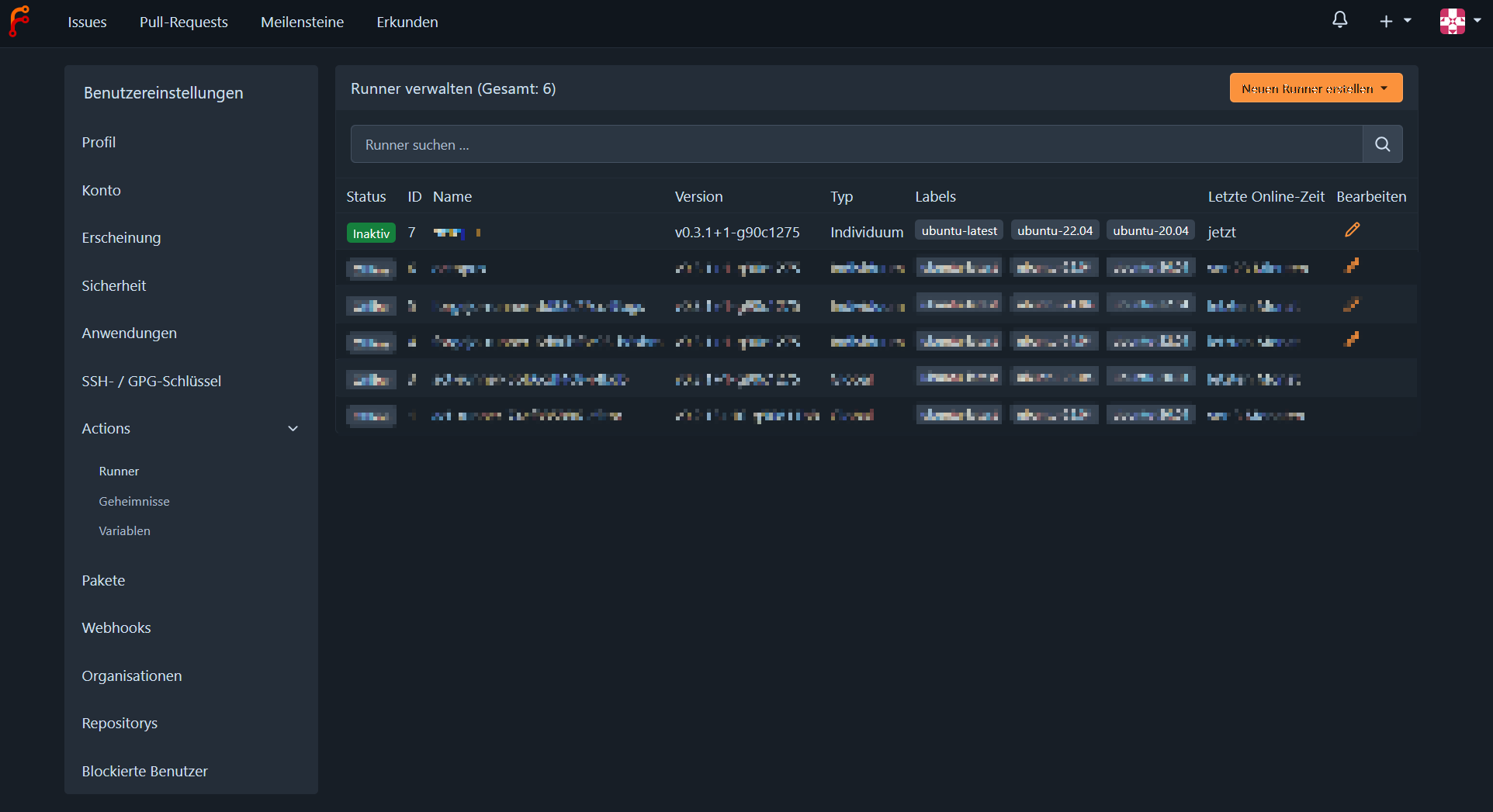
Now you are ready to create build workflows in your Git projects.