
Introduction
If you work as a developer with Kubernetes and a MicroService architecture you will get to the point where you need to route a Kubernetes Service to an external system.
The usecase is like this: your application runs in a Kubernetes cluster and contains of Micro Service 1 and Micro Service 2 and you have a Kubernetes deployment for this scenario. Micro Service 1 accesses Micro Service 2 using a Kubernetes service and is configured for this.
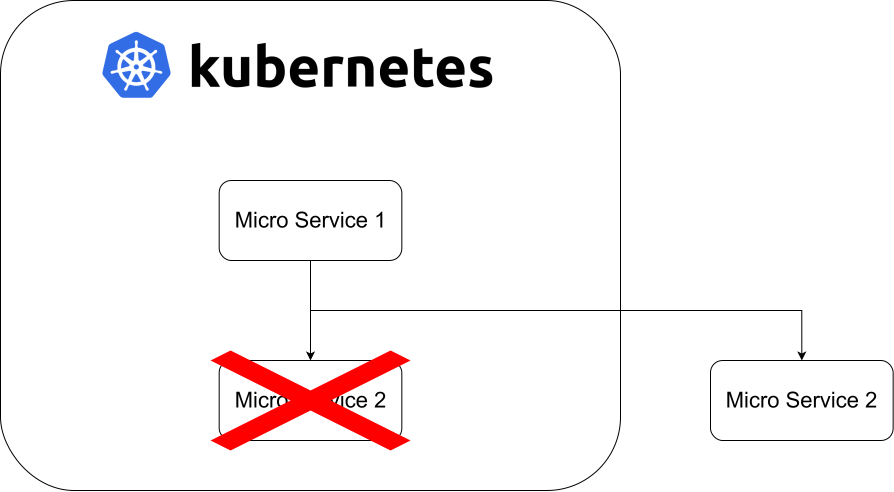
There are new requirements to your application and Micro Service 2 needs to be extended. As a developer you have two options for development:
Option 1: do changes in Service 2, run it through your CI/CD chain and do your integration checks in the TEST stage used by your team.
This approach is not straightforward, slow and time consuming. In worst case other people in your team are no more able doing their testing in TEST stage because it is broken by your changes.
Option 2: you have a running kubernetes locally running Service 1 and 2 like in the other stages. You reconfigure Kubernetes so you are able to start Service 2 locally from your Integrated Desktop Environment (IDE) and you can do the first integration testing locally.
This approach is straightforward, fast and TEST stage is fully funcational during your development.
Option 2 is my choice. For a locally running Kubernetes development environment I've been using Rancher Desktop by SUSE for several years now. The setup is very simple, you get a fully functional one node Kubernetes cluster with a pre-configured Traefik Ingress controller and Rancher Desktop is free of charge even if you use it commercially.
Rancher Desktop configuration
Configuring Rancher Desktop to use an external IP for a Kubernetes service is a little bit fiddly as you need to sweep through a lot of documentation which sometimes is not consistent.
Additionally, at the time of writing this post, Kubernetes Ingress API is frozen and the in the official documentation it is recommended to use Gateway instead of Ingress. Unfortunately the Gateway API is not supported in Rancher Desktop yet.
The Kubernetes docs also says Endpoints are deprecated and EndpointSlices should be used. EndpointSlices are not supported in Rancher Desktop yet. This situation makes it necessary to create a step‑by‑step guide that includes a demo project.
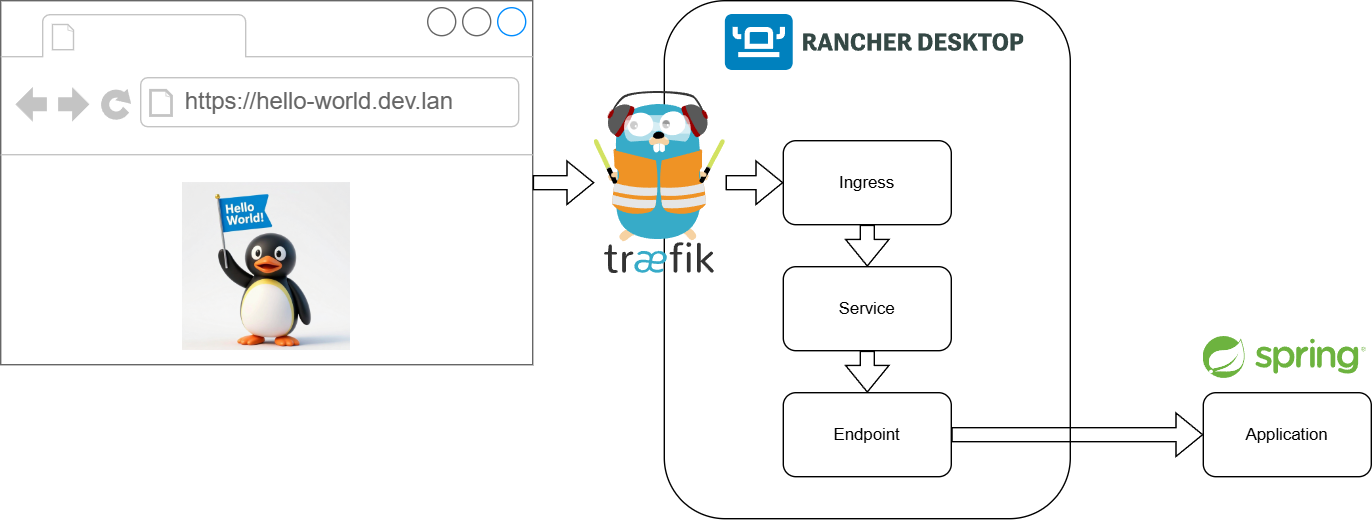
In this example the request from the browser is routed through Traefik (Ingress Controller) and through the Kubernetes in Rancher Desktop and utilizes the spring-boot application running outside of Kubernetes.
Example application
You can find the example application in GitHub. There you also find the instructions how to setup Rancher Desktop and the spring-boot demo application.
spring-boot 4.0.2
Kubernetes 1.35.0
Traefik 3.5.1
Create Namespace
As you do not want to mess up an existing namespace in your Kubernetes we create a new one only for this example application.
kubectl create namespace flexguseCreate Endpoint
Endpoints are deprecated since Kubernetes 1.33 and you get a warning when you create one. Nevertheless in Rancher Desktop the recommended EndpointSlices are not working, yet.
apiVersion: v1
kind: Endpoints
metadata:
  name: hello-world-service
  namespace: flexguse
subsets:
  - addresses:
      - ip: 127.0.0.1
    ports:
      - port: 8443
        name: http
protocol: TCPCreate Service
The Endpoint is used by a Service. The matching is done by the name which is the same in Endpoint and Service.
apiVersion: v1
kind: Service
metadata:
  name: hello-world-service
  namespace: flexguse
spec:
  ports:
    - name: http
      protocol: TCP
      port: 443
      targetPort: 8443
As you can see there is no selector in the Service configuration. This causes Kubernetes not to create an Endpoint or EndpointSlice automatically.
Create ServersTransport
Servers transport is a Traefik configuration. As the spring-boot application uses a self signed SSL certificate for transport encryption we need to configure Traefik not to verify certificates provided by backend services.
apiVersion: traefik.io/v1alpha1
kind: ServersTransport
metadata:
  name: ingoresslcerts
  namespace: flexguse
spec:
  insecureSkipVerify: true
Create IngressRoute
In the standard Kubernetes Ingress there is no possibility to configure Traefik to use the ServersTransport, so we use IngressRoute to create an Ingress.
apiVersion: traefik.io/v1alpha1
kind: IngressRoute
metadata:
  name: hello-world-http
  namespace: flexguse
spec:
  entryPoints:
    - websecure
  routes:
    - kind: Rule
      match: Host(`hello-world.dev.lan`)
      services:
        - kind: Service
          name: hello-world-service
          passHostHeader: true
          port: 443
          scheme: https
          serversTransport: ingoresslcerts
Create hosts entry
The last configuration to add an entry to your local hosts file.
127.0.0.1 hello-world.dev.lanAccess example application
Open https://hello-world.dev.lan in your favorite browser.
You browser will show a warning that the SSL certificate is not correct. When you examine the SSL certificate you will see this is a self signed SSL certificate created by Traefik. Accept this SSL certificate in your browser and proceed.
Now you get a HTTP 502 error in your browser, Kubernetes is not able to reach the spring-boot application.
Start the spring-boot application and reload. Now you should see a pinguin holding a flag.
DONE!
